Here’s a hard truth from real-world experience: most websites don’t fail because of poor design they fail because no one tested them properly.
I have witnessed companies invest thousands of dollars in development only to lose users in few seconds because of broken links, slow loading time or forms that do not work at all. In a scenario, an online shop lost close to 40 percent of the possible sales due to the inability of checkout button to work on mobile devices. None of them paid attention–until there were customers who left.
This is exactly where website testing becomes critical.
In order to have a quality control, your digital storefront is your web site. In absence of it you are asking the users to believe in something that might not work.
What Is Website Testing?
Website testing is the process of checking a web application or a web site against errors, performance, usability and security vulnerabilities before it becomes live.
In straightforward terms, it provides the answer to one question:
“Does everything work the way it should—for every user, on every device?”
This includes both manual testing (real users interacting with your site) and automated testing (tools scanning for issues).
Why Website Testing Is Critical for Business Success
Skipping proper QA testing can cost more than just money—it can damage your reputation.
Here’s why testing matters:
- First impressions matter: Users decide within seconds whether to stay or leave.
- Revenue impact: Broken checkout or forms = lost sales.
- SEO rankings: Google penalizes slow and poorly functioning websites.
- User trust: Errors reduce credibility instantly.
- Security risks: Unprotected websites are easy targets for attacks.
Real-World Insight
A SaaS startup I worked with had a perfect UI but slow loading speed. After performance testing, we reduced load time from 5 seconds to under 2 seconds. Result? Conversion rate increased by 27%.
Website Testing Checklist: Core Testing Types
A complete website testing checklist includes multiple testing layers. Let’s break them down one by one.
- Functional Testing (Does Everything Work?)
Functional testing ensures that every feature behaves as expected.
What to Test:
Links & Navigation
- Internal and external links
- Broken links and orphan pages
- Anchor links within the same page
Forms
- Input validation (correct and incorrect data)
- Required vs optional fields
- Error messages clarity
- Form submission success
Cookies & Sessions
- Behavior with enabled/disabled cookies
- Session expiration handling
- Login/logout flow
Database Testing
- Data saving and retrieval accuracy
- Data integrity
- Correct query execution
HTML/CSS
- Syntax errors
- Layout consistency
- Crawlability for search engines
Pro Insight:
Many teams test only “happy paths” (ideal scenarios). But real users make mistakes. Always test edge cases like wrong inputs or interrupted sessions.
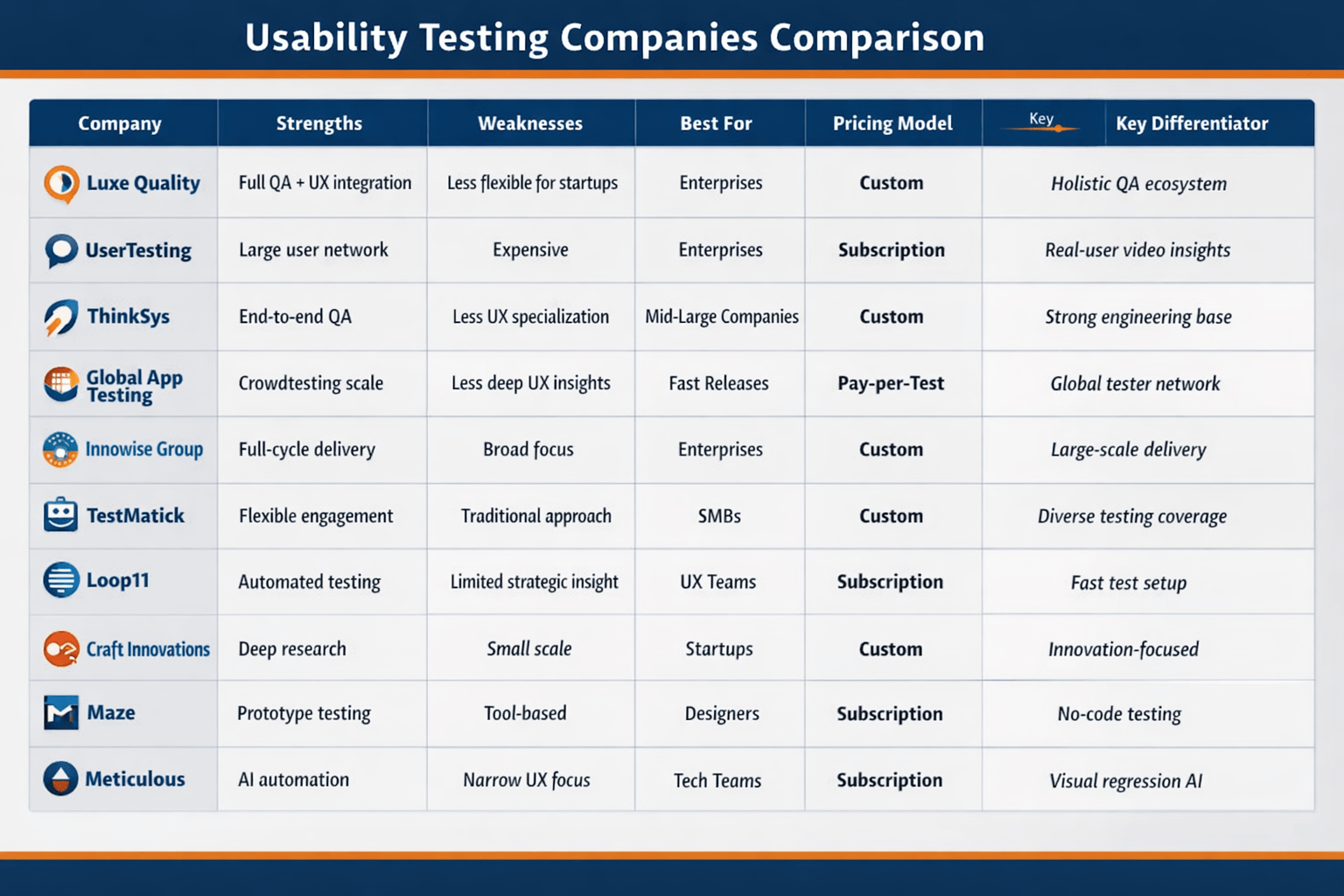
2. Usability Testing (Is It Easy to Use?)
Usability testing focuses on user experience. Even if your site works, it must feel effortless.
What to Evaluate:
- Navigation clarity (Can users find things easily?)
- Menu structure and hierarchy
- Button visibility and responsiveness
- Content readability (fonts, colors, spacing)
- Mobile usability
Example:
A client once had a perfectly working website—but users couldn’t find the “Contact Us” button. After repositioning it, inquiries increased significantly.
Usability Checklist:
- Is navigation intuitive?
- Are buttons clearly clickable?
- Is content readable on all devices?
- Is the design consistent?
What Most People Overlook:
Users don’t read—they scan. Structure your content for quick scanning.
3. Interface Testing (Do Systems Communicate Properly?)
This type of web application testing checks communication between systems.
Key Areas:
- Server and application interaction
- API responses
- Error handling messages
- Data flow between frontend and backend
Checklist:
- Are server responses accurate?
- Do errors display clearly?
- Is communication stable under load?
4. Compatibility Testing (Does It Work Everywhere?)
Your website must work across:
- Browsers (Chrome, Firefox, Safari, Edge)
- Devices (mobile, tablet, desktop)
- Operating systems (Windows, Android, iOS)
Focus Areas:
- Responsive design
- Layout consistency
- Feature functionality across devices
Real-World Scenario:
A website worked perfectly on desktop but failed on iPhone Safari. Result? Huge traffic loss from mobile users.
Pro Tip:
Use real devices whenever possible. Simulators are helpful but not always accurate.
5. Performance Testing (How Fast & Stable Is It?)
Performance testing ensures your website can handle traffic without slowing down or crashing.
Types:
- Load Testing (normal traffic)
- Stress Testing (extreme traffic)
- Spike Testing (sudden traffic surge)
What to Measure:
- Page load time
- Server response time
- Stability under load
Tools:
- LoadNinja
- Google PageSpeed Insights
- GTmetrix
Expert Insight:
A delay of even 1 second can reduce conversions significantly. Speed is not optional—it’s essential.
6. Security Testing (Is Your Website Safe?)
Security testing protects your website from threats and unauthorized access.
Checklist:
- SSL certificate verification (HTTPS)
- Authentication and authorization checks
- Protection against SQL injection
- Secure data storage
- Restricted file access
Real Risk:
I’ve seen small websites hacked simply because admin panels weren’t protected. Security is not just for big companies.
Manual vs Automated Testing
Automated Testing:
- Fast and scalable
- Good for repetitive tasks
- Tools: LambdaTest, Selenium
Manual Testing:
- Human perspective
- Better for usability and real-world scenarios
Best Approach:
Use a combination of both.
Common Website Testing Mistakes (And How to Avoid Them)
Mistake 1: Testing Only Before Launch
Fix: Test continuously during development.
Mistake 2: Ignoring Mobile Users
Fix: Always prioritize mobile-first testing.
Mistake 3: Over-Reliance on Automation
Fix: Combine with manual testing.
Mistake 4: Skipping Security Checks
Fix: Include security testing as a priority.
When Should You Hire QA Professionals?
You should consider hiring QA experts when:
- Your website is complex
- You lack testing expertise
- You need unbiased results
- You want faster, professional results
Why It Matters:
Professional testers:
- Identify hidden bugs
- Use advanced tools
- Provide actionable insights
Tools for Website Testing
Here are some widely used tools:
- LambdaTest – Cross-browser testing
- LoadNinja – Performance testing
- CrossBrowserTesting – Device compatibility
- Selenium – Automation testing
Final Thoughts: Testing Is Not Optional It’s Your Competitive Advantage
Website testing may seem overwhelming, but it’s one of the smartest investments you can make.
A well-tested website:
- Builds trust
- Improves SEO rankings
- Boosts conversions
- Protects your brand reputation
Key Takeaways:
- Test early and continuously
- Focus on real user experience
- Combine manual and automated testing
- Never ignore performance and security
Let’s build software that performs flawlessly.